

How to review a PDF with clients without scheduling another meeting
Use page-specific comments, clear versions, and one client link to review PDFs asynchronously.

A PDF review slows down when feedback arrives as a list of page numbers in email or chat.
The faster approach is simple: open the correct version, comment on the relevant page, and let everyone see which points are still open.
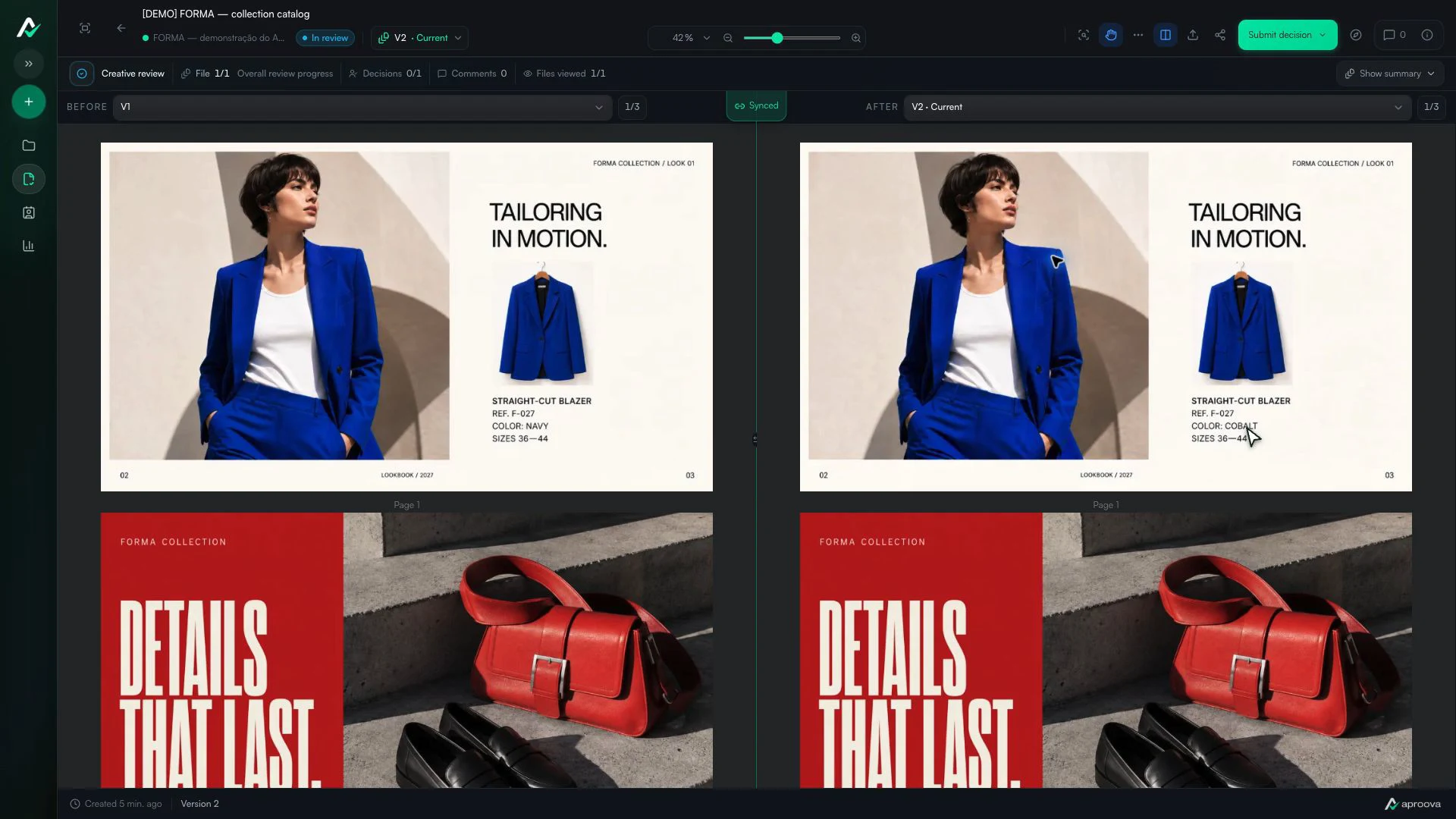
What the video shows
Versions 1 and 2 appear side by side. The color name changes; reference F-027 and sizes 36–44 stay the same. Recorded in Aproova using a fictional fashion collection and test comments.
Send the page, not an explanation
A reviewer should be able to open the PDF and point to the exact area that needs attention. This avoids instructions such as ‘the second paragraph on page 14’ becoming ambiguous after the layout changes.
Separate comments from decisions
A comment is a requested change or question. Approval is the decision that the current PDF can move forward. Keeping those actions separate makes the status understandable.
Share one controlled link
Use a review link that opens the intended file and version. If access needs to end, revoke the link instead of leaving an old attachment in circulation.
Write feedback another person can act on
“Fix page 14” still leaves room for doubt. A useful note says what is wrong and what should replace it: “On page 14, change the price in the blue table from 49 to 59.” A marker on the table removes the last bit of guesswork.
Precise feedback is shorter because it does not need a second conversation to explain itself.
Long PDFs need predictable navigation
Catalogues and presentations may contain dozens of pages. Reviewers need to know which page they are on, move to the next open comment and zoom without losing their place. If the document jumps back to page one, people stop checking carefully.
For a large file, split the work only when different people own separate sections. Otherwise, keeping one document preserves page order and the final approved file.
Know when a meeting is still useful
Asynchronous review works well for specific corrections and a clear decision. A meeting may still be faster when the team is choosing between entirely different directions or when one change depends on several business decisions.
Use the meeting to resolve the choice. Put the resulting changes and approval back in the PDF review afterwards.
Questions people ask before setting up the workflow
Should every PDF comment require a new version?
No. Questions can be answered in place. A new version is needed when the file itself changes or when the team needs a clean round for verification.
How do I avoid feedback on an old PDF?
Keep versions in one review, make the current version visible and share a link that resolves to the intended file. Revoke old public links when access should end.
Can reviewers comment without downloading the PDF?
Yes, when the review tool renders the pages in the browser. Download can remain available according to the workspace permission.
Continue with these guides

Catalog proofing checklist: review prices, pages and versions
Use a catalog proofing checklist to review product details, prices, images and page order. Includes sample feedback and a sign-off brief for your team.
Read guideHow to compare creative versions without relying on memory
Use side-by-side and overlay comparison to check changes before approving the final artwork.
Read guide
Approval platforms: language, client access and purchasing terms
Assess language, client access, versions, history and purchasing terms before choosing an approval platform.
Read guide