

How to compare creative versions without relying on memory
Use side-by-side and overlay comparison to check changes before approving the final artwork.

A revised file can fix the headline and quietly bring back an old price. Visual memory rarely catches every regression.
Compare both the requested change and the parts that should have stayed untouched.
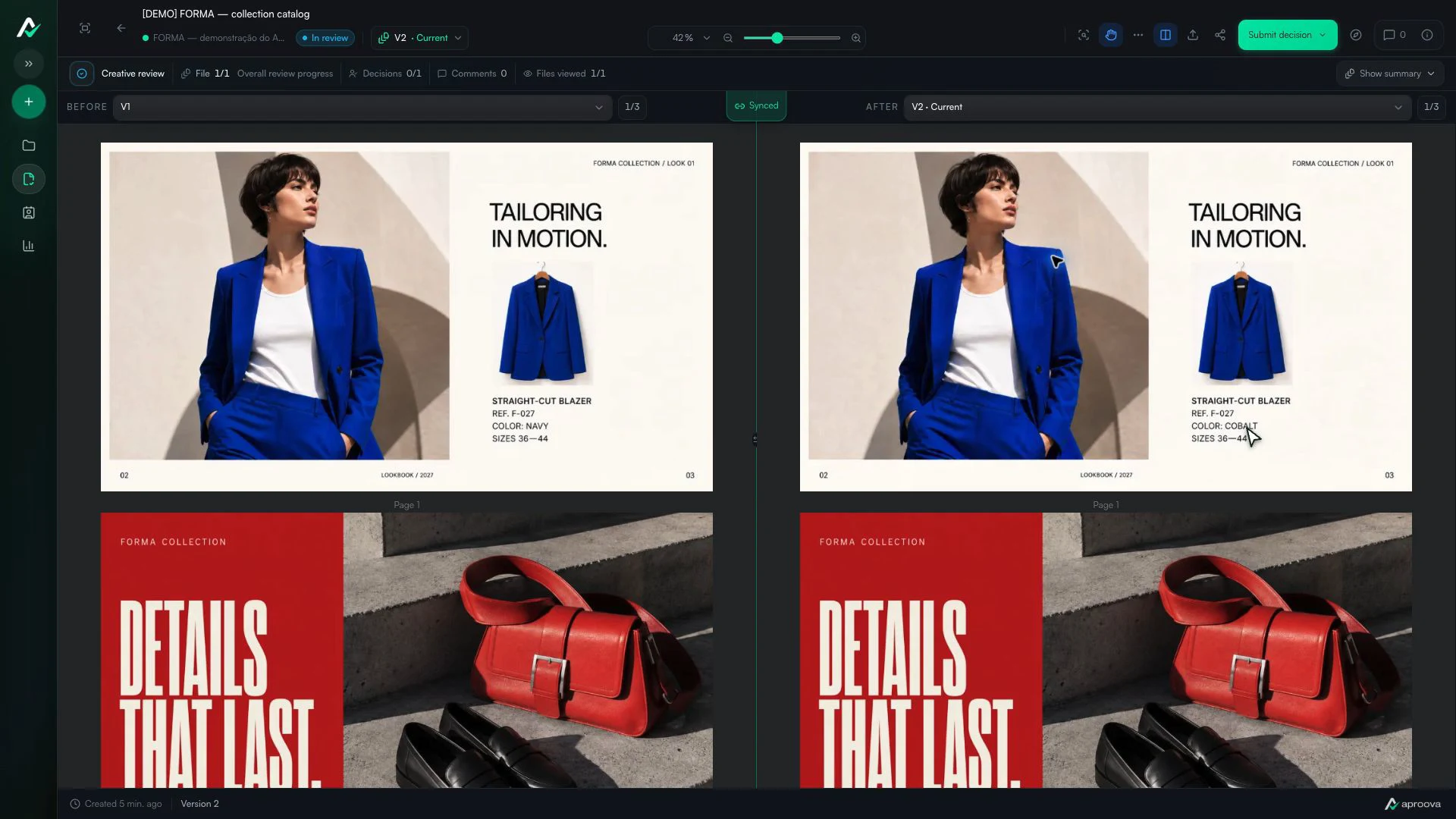
What the video shows
Versions 1 and 2 appear side by side. The color name changes; reference F-027 and sizes 36–44 stay the same. Recorded in Aproova using a fictional fashion collection and test comments.
Start with the request behind the revision
Read the comments that led to the new version. They form a short list of expected changes and stop the review from becoming a random search.
Then inspect the complete composition. A local correction may alter balance, line breaks, or hierarchy elsewhere.
Use the view that suits the change
Side-by-side works for new layouts, different images, and major crops. Overlay works for alignment, spacing, logo position, and smaller visual shifts.
Both versions need the same zoom and position. Otherwise, the reviewer compares two different frames rather than two files.
Approve the delivered file
Attach new comments to the current version and resolve the requests that were handled. Before deciding, open the current file without comparison and check its name and format.
Comparison confirms the change. Approval authorizes one specific version.
Check regressions as well as corrections
A new export may contain the requested photo while restoring an old headline. Ask whether the change was made and whether everything else stayed correct.
This second check is what makes comparison more reliable than opening the new file and looking only at the marked area.
Different dimensions need a reference point
When the format changes, align a stable element such as the logo, product, or main grid before using overlay. If the composition is entirely different, side-by-side is the more honest comparison.
Questions people ask before setting up the workflow
When should I use overlay comparison?
Use it for alignment, spacing, logo position, and other small differences between similarly sized layouts.
Why synchronize zoom and position?
It keeps both versions on the same visual reference. Without synchronization, scale differences can look like design changes.
Do previous comments belong on the new version?
They remain in the history as context. New issues should be attached to the version currently under review.
Continue with these guides

Catalog proofing checklist: review prices, pages and versions
Use a catalog proofing checklist to review product details, prices, images and page order. Includes sample feedback and a sign-off brief for your team.
Read guide
Two approvers disagree about the same artwork. How to move the review forward
One approver requests a change and another asks for the opposite. Record the conflict, identify who decides and avoid creating a version based on guesses.
Read guideThe client approved the artwork, then requested a change. Which decision applies?
Handle a change requested after approval, identify the authorized version and record a new decision without losing the history.
Read guide