

Catalog proofing checklist: review prices, pages and versions
Use a catalog proofing checklist to review product details, prices, images and page order. Includes sample feedback and a sign-off brief for your team.

A catalog can contain the right products and still go out with an old price, a missing size or a photo from the previous collection. Each reviewer needs a clear job and access to the same PDF version.
Use the checklist below for content approval. Ask your printer or production specialist to confirm print specifications separately; a browser review does not establish that a file is ready for press.
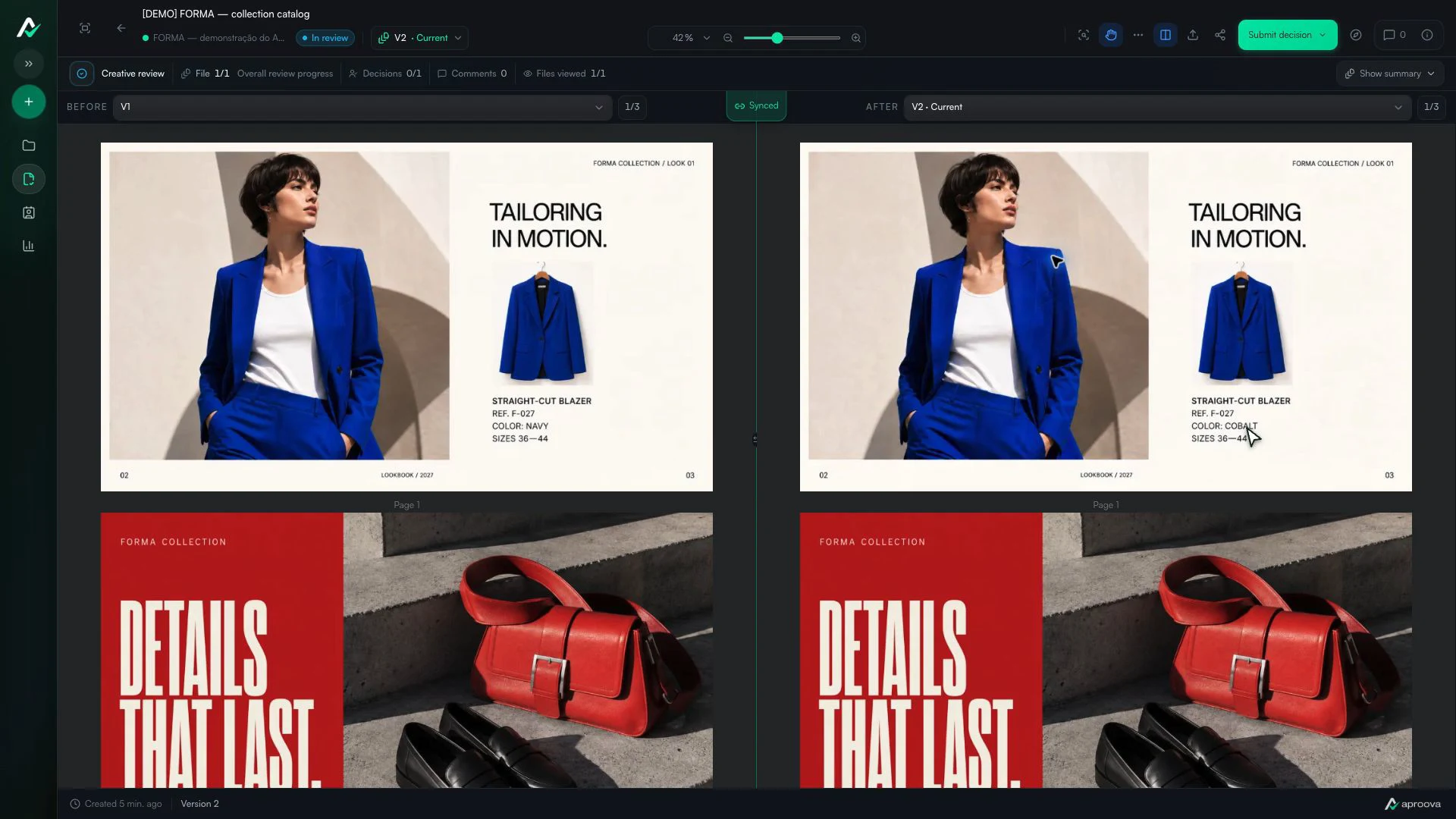
What the video shows
Versions 1 and 2 appear side by side. The color name changes; reference F-027 and sizes 36–44 stay the same. Recorded in Aproova using a fictional fashion collection and test comments.
1. Name the file and the decision you need
Before sharing the PDF, record the collection or edition, filename, version and page count. Say whether this round covers product data, copy, layout or final content approval. If only one section is ready, name it explicitly.
Open the exported PDF and check the first and last pages, page order, orientation and readable text. A correct design file does not guarantee a correct export. If you use printed page numbers, distinguish them from the PDF viewer’s page counter.
2. Assign checks by subject
Product checks references, names, variants and specifications against the agreed product data source. The commercial team checks prices, currency, offer dates and any conditions shown beside an offer. Design checks images, captions and layout. Assign required legal or regulatory text to the person qualified to review it.
Have everyone review the same version. Separate PDFs are useful when sections have independent owners and approvals; otherwise, combining them later introduces another chance to mix versions. Name the person who resolves conflicting feedback and the person who can approve the complete catalog.
3. Make each correction verifiable
A useful note includes the page, product reference, current content and requested replacement. For example, in a fictional catalog: ‘PDF page 12, item AB-204: replace “500 ml” with “450 ml” to match the approved product sheet.’ Mark the label itself so the designer can locate it.
State whether the issue blocks approval or needs an answer. A question about a photo may be resolved in the comment thread; an incorrect capacity requires a corrected file. Keep the reason and reference alongside the request instead of spreading them across email replies.
4. Check the revision and its surrounding pages
Add the corrected PDF as a new version and revisit each required change. Then check neighboring content: a longer product name can push a price onto another line or move a caption to the next page. Look for new problems as well as completed corrections.
When page order changes, use the product reference and marked area in the previous version to find the corresponding item. Do not assume that a comment on page 12 still concerns page 12 in the revision. Resolve the request only after someone has checked the delivered change.
5. Record what the sign-off covers
Before closing the round, identify the version, approver, date and approval scope. Copy this brief and fill in the blanks: ‘Edition: __. PDF/version: __. Page count: __. Checks completed: __. Open items: __. Decision and scope: __. Approved by/date: __.’ This is a suggested team checklist, not a claim of legal certification.
If the content is approved but the printer still needs to check color, bleed or other production requirements, record that limitation. Ask the printer to confirm the specifications for this particular job rather than applying a generic setting to every catalog.
A comment should survive a layout change
“Page 37: replace image” may point to the wrong content after reflow. Mark the image and describe the intended replacement. The version history keeps the original location available even when later pages move.
For a repeated rule, write one main comment and mark a few examples instead of adding the same sentence to every page.
Approval needs a stated boundary
In Aproova, page comments, version comparison and recorded decisions support this review. They do not automatically validate prices, barcodes, color accuracy or print readiness. Those checks still need the right source material and reviewer.
Questions people ask before setting up the workflow
Should a large catalog be split into several PDFs?
Only when sections have independent owners and approvals. One PDF preserves order and reduces the risk of combining pages from different versions.
Does every comment need a new version?
No. Questions can be answered in the thread. Required changes need a corrected file and another check.
Can clients comment without downloading the PDF?
Yes. A review platform can render pages in the browser and keep download permission separate.
Continue with these guides

How to review a PDF with clients without scheduling another meeting
Use page-specific comments, clear versions, and one client link to review PDFs asynchronously.
Read guideHow to compare creative versions without relying on memory
Use side-by-side and overlay comparison to check changes before approving the final artwork.
Read guideHow to review packaging and labels without missing a critical change
Organize packaging review across design, product, regulatory, and production teams while keeping every decision tied to a version.
Read guide