

How to collect video feedback without chasing timestamps
A straightforward way to review video by frame, keep comments in context, and approve the right cut.

Video feedback becomes hard to act on when every reviewer describes time differently.
A comment attached to the playback position gives editors the context they need and keeps the next cut connected to the original request.
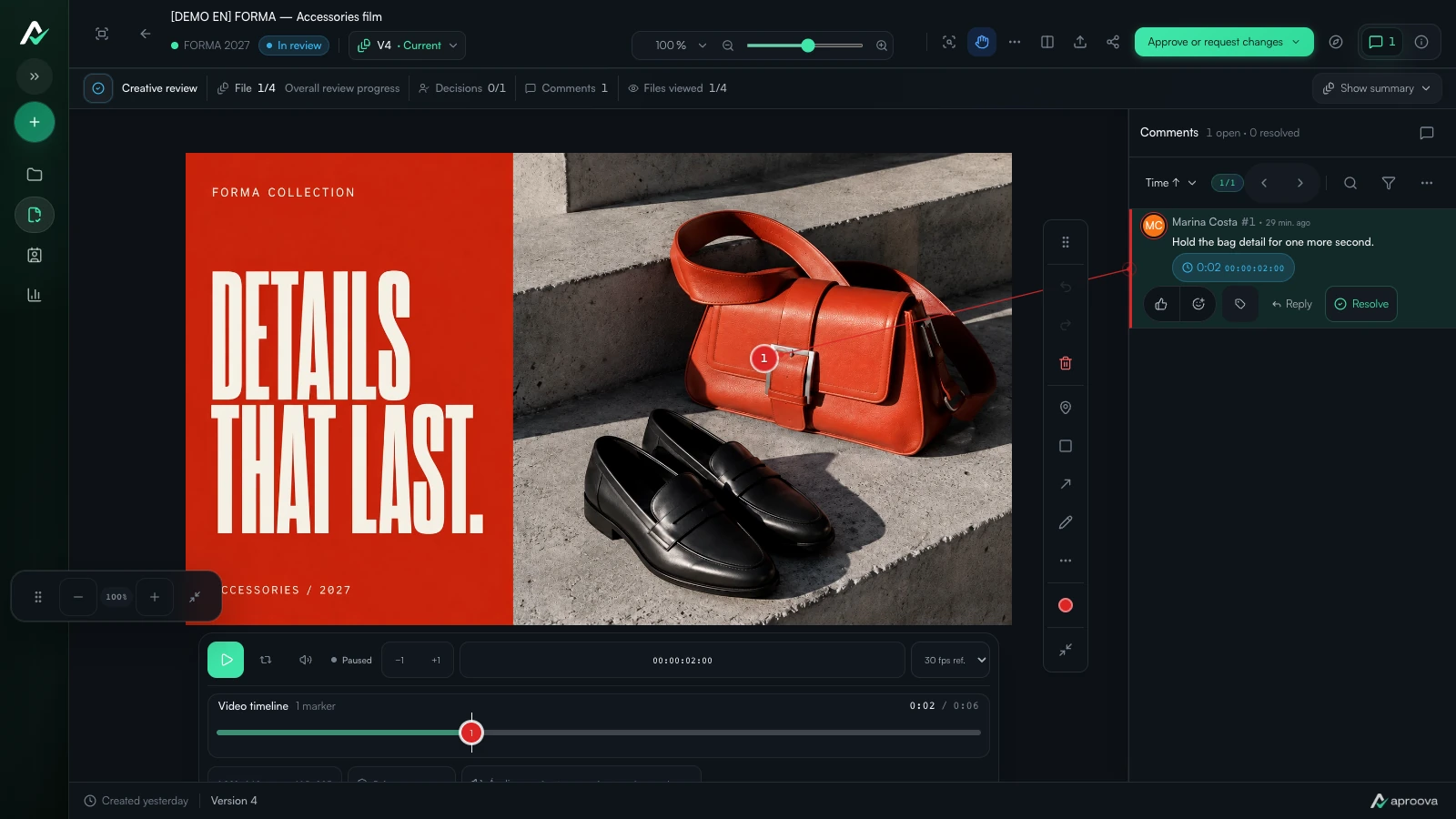
What the video shows
The fictional FORMA accessories film plays in Aproova. The reviewer pauses it and opens a comment asking for one more second on the bag detail. The comment is linked to its moment on the timeline.
Comment at the right moment
Pause where the change is needed and write the comment there. The editor can return to that moment directly instead of translating a message into a timestamp.
Review the whole cut before deciding
Open comments may affect later scenes, sound, or timing. Resolve the round, upload the next version, and review the current cut before approval.
Keep the approved cut obvious
The approval should identify the version that can be published. That removes doubt when exports and alternate formats are prepared.
Describe the change, not only the moment
A timestamp finds the frame, but the editor still needs an instruction. “At 00:18, hold the product shot for one more second” is useful. “This part feels off” usually starts another round of questions.
If the note concerns audio, subtitles or a transition, say so. The visual frame alone may not explain the request.
Check what the edit changed downstream
Moving one shot affects timing, music and sometimes every subtitle that follows. After a new cut arrives, reviewers should watch the complete version rather than jumping only to the previous comments.
Resolved comments show what was addressed, but they do not replace a final viewing.
Separate the master from delivery formats
A campaign may need a master cut plus square, vertical and short versions. Decide whether the approval covers the edit itself or every exported format. That small sentence prevents a team from treating an approved master as approval of an unchecked crop.
If each format changes the composition, keep them visible in the same review package and record which ones were actually seen.
Questions people ask before setting up the workflow
Do reviewers need to write timestamps manually?
No. A review player can capture the current playback time when the comment is created.
Should a new cut use a new link?
Usually not. Uploading the cut as a new version keeps earlier feedback and makes it clear which version is current.
What should a final video approval record?
The approved version, the person who decided and the time of the decision. If approval covers only a master or specific formats, record that scope too.
Continue with these guides

How to compare creative versions without relying on memory
Use side-by-side and overlay comparison to check changes before approving the final artwork.
Read guide
Approval platforms: language, client access and purchasing terms
Assess language, client access, versions, history and purchasing terms before choosing an approval platform.
Read guideThe client approved the artwork, then requested a change. Which decision applies?
Handle a change requested after approval, identify the authorized version and record a new decision without losing the history.
Read guide