

Video and creative review
The change was at 12 seconds.
Stop searching the chat.
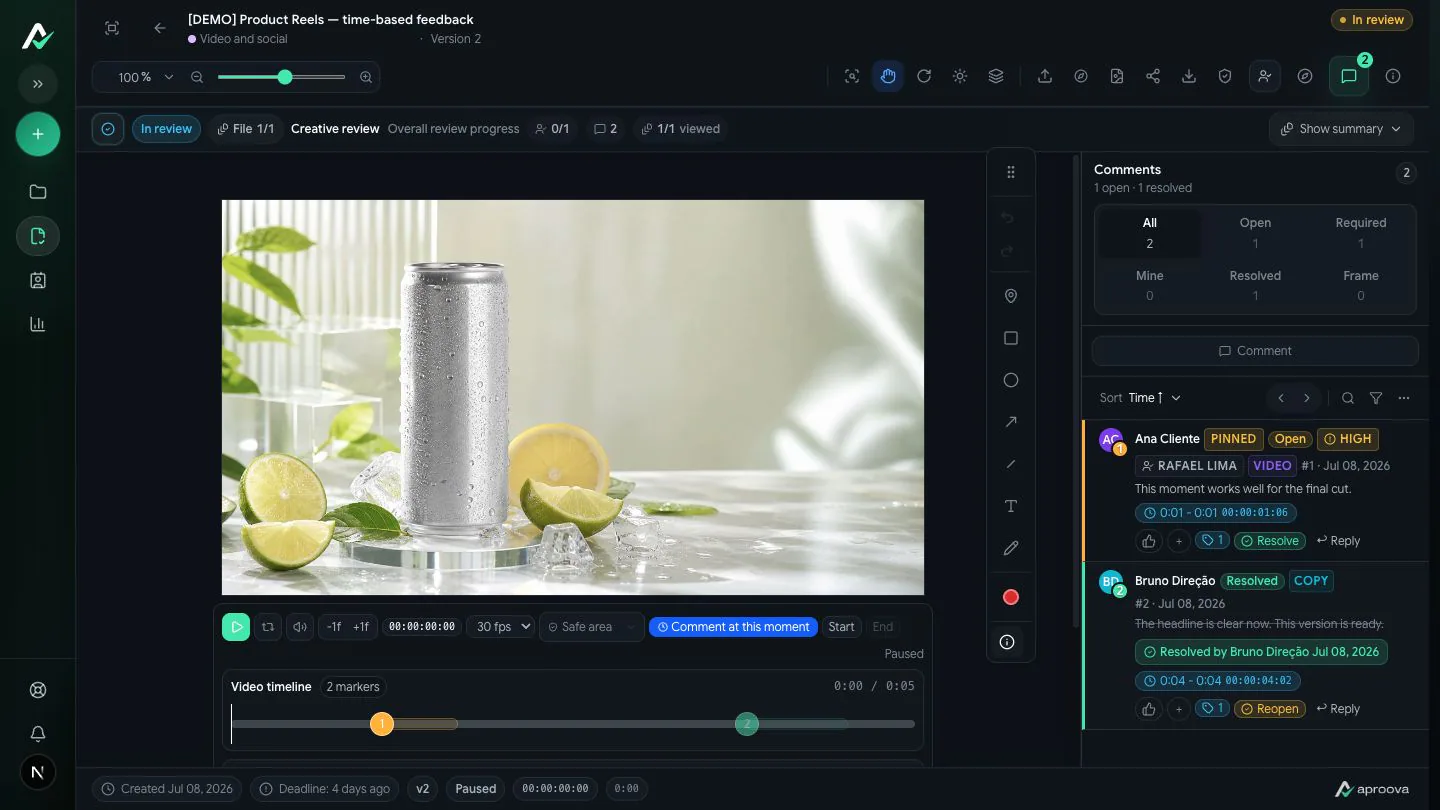
Point to the moment that needs work. Your team and client comment on the video, follow its versions and record which cut was approved.
Free plan to start: 5 reviews per month, 2 users, 2 GB and files up to 25 MB. Paid plans include a 14-day trial, no credit card.
Aproova keeps feedback, versions and approval together. Editing and final delivery stay in your video software.
See Aproova in use
The feedback, version and decision in one place.
Explore three product screens. The files and people are demo examples.
Mark the exact spot and explain the change. Feedback stays attached to the work being reviewed.
The real work
'Change that scene' slows down the whole edit.
When feedback comes by voice note or chat, the editor has to guess the moment, the version and who has the final say.
No time reference
The request arrives without the exact moment in the video.
Cuts everywhere
Links and files from different versions get mixed up between team and client.
Delivery without a decision
Approval gets lost in conversation and is hard to tie to the final cut.
How it works
From first cut to approved video.
Try the flow with a real campaign video.
Upload the video
Start a review and invite your team or client by link.
Comment at the moment
Mark the time and describe what needs to change.
Add another cut
Keep the next version in the review history.
Record approval
Close the loop with a decision on the final version.
What fits
Timed feedback, version history and a decision.
Video can move through the same workflow as campaign artwork and PDFs.
Included in a review
- Video with time-based comments
- Next cut in the review history
- Team and external reviewers by link
- A recorded decision on the final version
- Files up to 25 MB on Free · up to 500 MB on paid plans
Not part of the product
- Video editing, rendering or export
- Advanced post-production tools
- Social media scheduling or publishing
- Live website or HTML5 banner review
Best fit
Video as part of a wider creative workflow.
A fit if
- You approve videos alongside artwork, PDFs and other assets
- Your team and client need to comment on the same cut
- You need a record of which version was approved
Probably not if
- You need to edit or render video inside the tool
- You rely on advanced post-production or frame-by-frame comparison
- The file exceeds your plan's limit
Pricing
Clear monthly pricing without charging clients for seats.
External reviewers are unlimited on every plan, including Free, and never take up a user seat.
Common questions
What you may want to know before starting.
Can I point to the exact moment?
Yes. Comments can be tied to the time in the video being reviewed.
Does the client need an account?
No. External reviewers can join by link.
Does Aproova edit or render videos?
No. It organizes review, versions and decisions; editing stays in your video software.
What is the file limit?
Free accepts files up to 25 MB. See paid plans for larger files.
Bring the video waiting for feedback.
We will walk through a timed comment, the next cut and the final decision with your team.
Free plan to start: 5 reviews per month, 2 users, 2 GB and files up to 25 MB. Paid plans include a 14-day trial, no credit card.