
From Aproova to monday: send the decision to the right item
Link an Aproova review to a monday item, map statuses and follow new versions and decisions. Setup guidance for eligible plans.
The artwork is approved, but the board still says it is in progress. Someone has to open the review, check the version and update the item. When this handoff relies on memory, the board stops reflecting the work.
The Aproova and monday integration sends the decision to the linked item. It is available on plans with native integrations, starting with Flow. The monday account and its costs are separate.
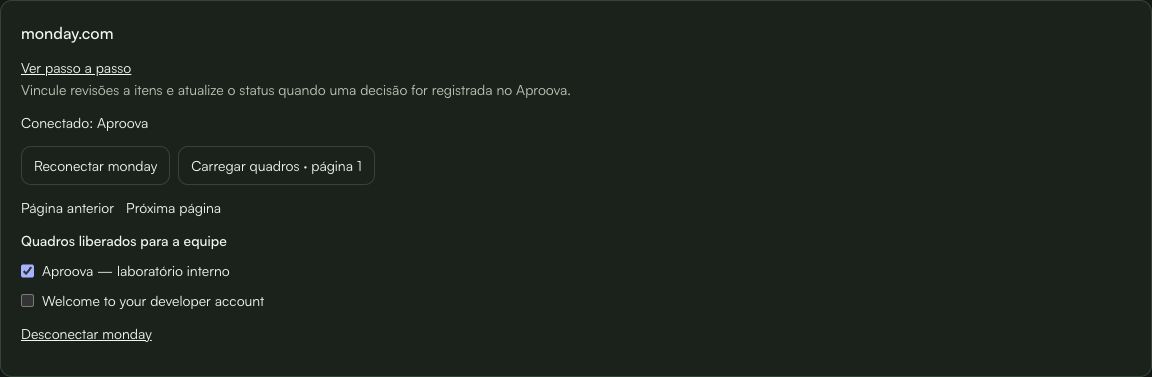
First, the owner selects the available boards
In Settings → Integrations, the owner connects the monday account and checks the permissions requested during authorization. They then load the boards and enable those the team may use.
This does not link projects or folders automatically. The destination is selected within each review by someone who already has access to it.
Each review points to an item
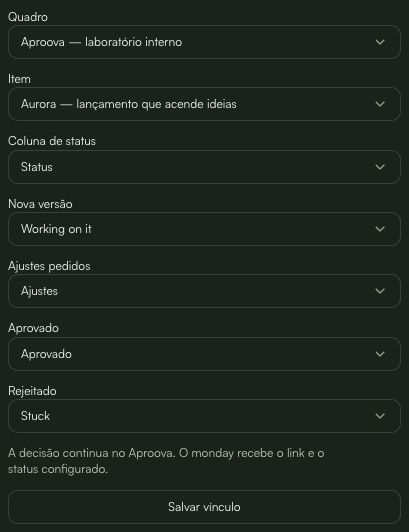
Open Review details → History → monday.com. Select the board, item and status column. Then map each event's outcome to labels your team already uses.
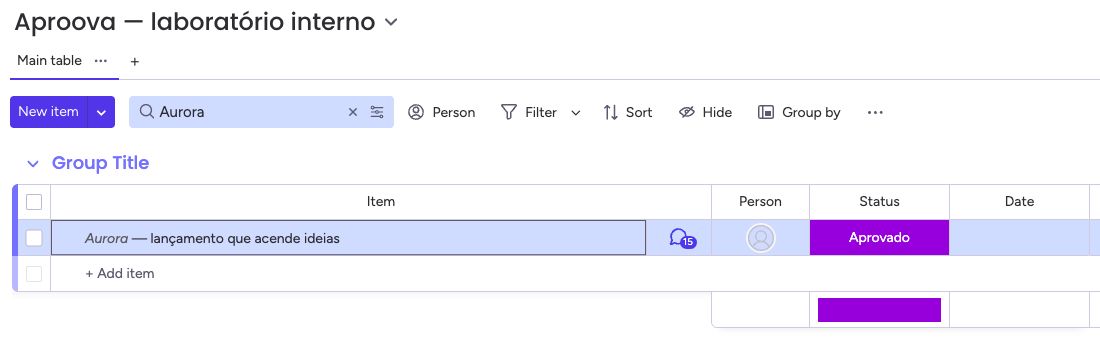
In the example, a new version returns to Working on it; a request for changes goes to Ajustes; an approval goes to Aprovado; a rejection goes to Stuck. These names belong to the demonstration board and are not mandatory labels.
You can choose Do not change status for an event. The link requires at least one mapped event. Use Load more boards and Load more items to continue selecting beyond the first page.
The result appears on the board; the decision stays in the review
When a new version is published or a decision recorded, Aproova sends an update to the item and applies the configured status. The link opens the review in Aproova and still requires access. It does not make the file public.
Synchronization runs from Aproova to monday. Manually changing the item's status does not approve or reject the review. Comments, files and the full decision rationale remain in the review; the connector sends an event summary.
Versions marked as internal only do not generate external updates.
If synchronization stops, check the link
Delivery may take a few moments. Check the latest synchronization in the review details. If a column, label or destination has changed, review the configuration before using Try synchronizing.
When the account needs authorization again, the owner can reconnect it under Integrations. Unlink stops synchronization for one review; Disconnect monday stops the workspace connection. Updates already published remain in monday.
In the internal HTTPS test, we validated linking, new versions, change requests, rejection, approval, token renewal and recovery of a delivery without creating another update. This proves the tested flow; it does not remove API limits or future provider changes.
Start with a test review
Use an item and material without client data to check the mapping. Only then link real work that your team is authorized to share with monday.
Installation is direct, outside the marketplace. The monday account administrator may need to authorize it. Check your Aproova plan before connecting.
Questions people ask before setting up the workflow
Does changing the status in monday approve the review?
No. The decision is recorded in Aproova. Synchronization sends the result to monday.
Does the published link give public access to the file?
No. The internal link still requires access to the review.
Is the integration in the marketplace?
No. The app uses direct installation outside the marketplace.
Continue with these guides

The client will not approve the artwork: what to check before another revision
Investigate unclear criteria, missing decision authority and unanswered questions before revising again. Define responsibilities, revision rounds and feedback on the asset.
Read guide
Online proofing for agencies: how it works and when it helps
Learn how online proofing connects comments, versions and campaign approval across designers, account managers and clients.
Read guide
The client approved the artwork, then requested a change. Which decision applies?
Handle a change requested after approval, identify the authorized version and record a new decision without losing the history.
Read guide