

Post approval
Post approval with your client,
no sign-up.
Your client opens a link, comments on the artwork itself and approves. Nothing to install, no account, no password.
Free plan to start: 5 reviews per month, 2 users, 2 GB and files up to 25 MB. Paid plans include a 14-day trial, no credit card.
Use Aproova to review the work and record the decision. Schedule and publish with your existing social media tool.
See Aproova in use
The feedback, version and decision in one place.
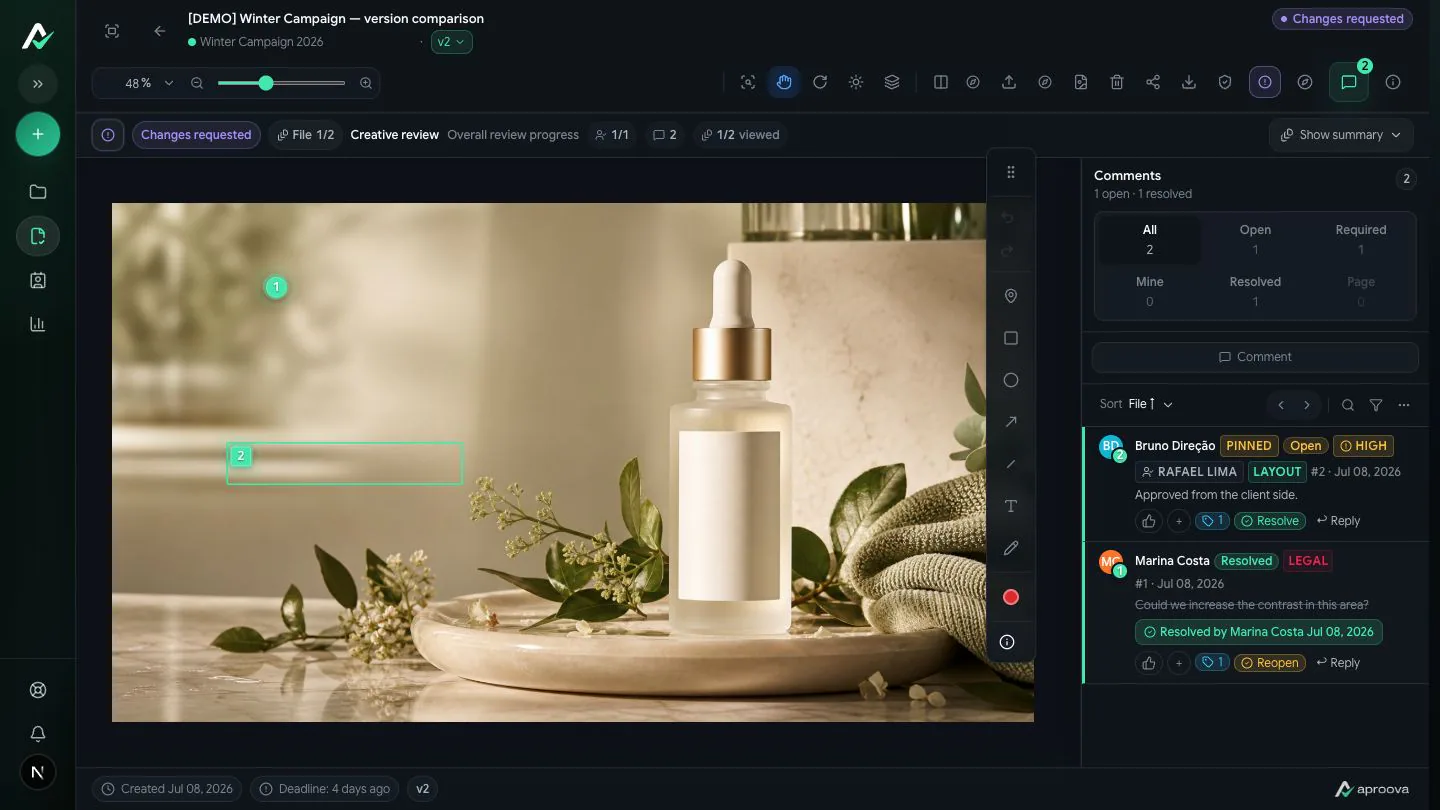
Explore three product screens. The files and people are demo examples.
Mark the exact spot and explain the change. Feedback stays attached to the work being reviewed.

Creative work
A post can be one part of a much bigger campaign.
When a delivery has many formats and reviewers, discuss the creative work before scheduling it.
The problem
Feedback without a place becomes rework.
A change request needs context. In Aproova, the client marks the exact spot on the artwork and explains what needs to change.
“The logo is too small.”
Where? On which of the five carousel cards? Without the spot, the fix is guesswork.
“Approve the new version.”
Which one is new? With no version history, whoever publishes is picking blind.
“I never approved that.”
With no record of who decided, when and on which version, the rework comes out of your pocket.
How it works
From finished file to recorded sign-off.
Four steps. The client only takes part in the third one, and without creating an account.
Upload the asset
Image, carousel, PDF or video. One review can hold several files.
Review internally
From the Flow plan on, your team comments privately before the client sees anything.
Send the link
The client opens it on their phone, clicks the spot and writes. No sign-up, no password.
Record the decision
Approved or changes requested, with author, date and version. The link can be revoked at any time.
What's included
Formats and limits, no fine print.
Everything below supports full review, with comments anchored to the spot, the page or the second.
Included in a review
- Images (JPG, PNG, WebP, GIF, HEIC)
- Multi-page PDF, with comments per page
- Video with comments on the timecode
- Adobe source files (.ai, .eps, .indd, .idml, .psd, .psb) with a reviewable preview
- Files up to 500 MB on paid plans · 25 MB on Free
Not part of the product
- Scheduling and publishing to social networks
- Live website or HTML5 banner proofing
- Standalone audio
- Word and PowerPoint — export to PDF before uploading
Is it for you?
Better said now than at the end of the trial.
Worth it if
- You approve more than posts: multi-card carousels, proposal PDFs, video, campaign assets
- You have already lost money because someone approved the wrong version
- You need to prove who approved what, and when
- You have an internal team that reviews before the client sees anything
Probably not if
- You mainly need to publish — a scheduler does that better and costs less
- You are a freelancer with a handful of clients and a very small budget
- Your work is almost entirely production video — there are deeper tools for that
Pricing
Clear monthly pricing in US dollars.
External reviewers are unlimited on every plan, including Free, and never take up a user seat.
Common questions
What you may want to know before starting.
Will my client manage to use it?
They open a link, like opening a news article. It works on mobile. No account, nothing to install, no password.
Do you publish to Instagram?
No. We handle approval and record the decision; you publish wherever you already publish.
Can I notify the client on WhatsApp?
Yes, from the Flow plan on. The WhatsApp integration is native and works with five providers, including Meta's official API.
What if I already use Trello?
Even better. The integration is native: the card stays the task, the review becomes a link on the card and the status flows back.
How many people can review?
As many as you want. External reviewers are unlimited on every plan and never take a user seat.
What happens when the trial ends?
If you don't subscribe, the workspace returns to the Free plan. Nothing is charged and nothing is deleted.
Start with the next asset that needs approval.
Upload a real piece, send the link to whoever decides, and see what the record looks like at the end.
Free plan to start: 5 reviews per month, 2 users, 2 GB and files up to 25 MB. Paid plans include a 14-day trial, no credit card.