

Aproova
Reviewer invitations
Share the review with the right person and make their permissions clear.
In practice
The person receives only the access you confirmed.
See the context in the app
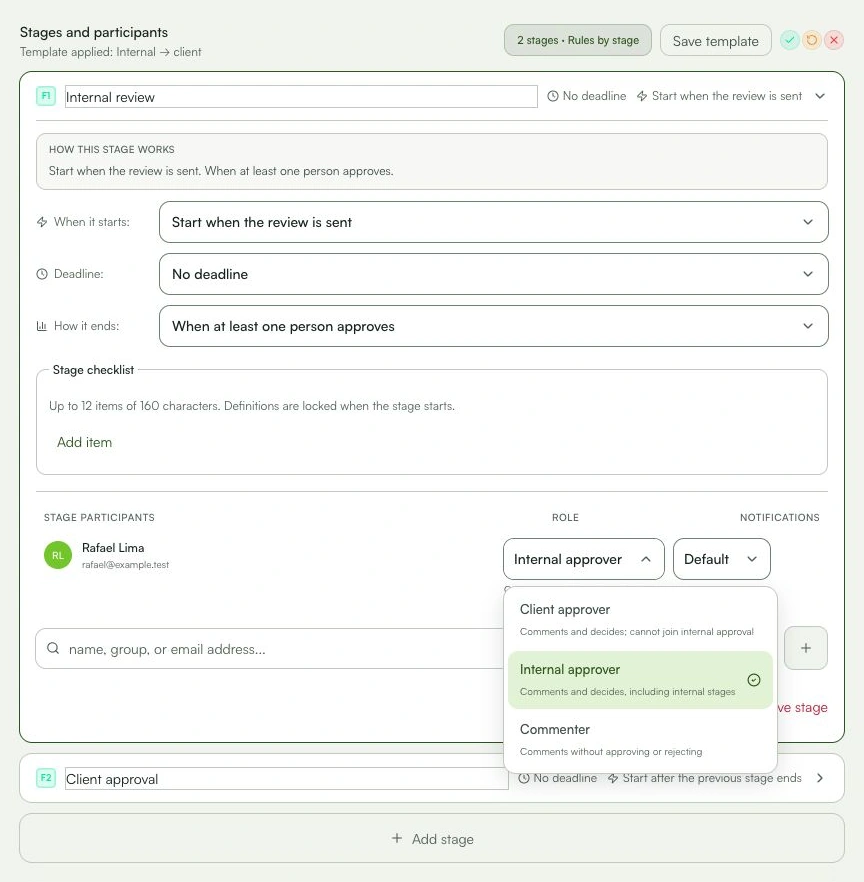
Learn with an example
One action at a time.
Share the review with the right person and make their permissions clear.
Step 1
Open the stage where the person will take part.
Step 2
Choose a member or group, or enter an email address.
Step 3
Choose whether they will be an approver or commenter.
Step 4
Check the stage and notifications.
Step 5
Confirm the invitation. An individual link only appears when that access is available.
What you can do
The person receives only the access you confirmed.
Check these details
What do I need before I start?
- A review with a confirmed file.
- Reviewed stages and permissions.
- The correct email address, when required.
How do I know I’m done?
The person receives only the access you confirmed.
Something didn’t work. What should I check?
- Correct a wrong email before resending.
- Create a new invitation when the previous one expires.
- Review the role and stage if access is broader than needed.
Continue your review
Reviewer invitations
Share the review with the right person and make their permissions clear.